Free widgets: the daily number
The free widget is for the simplest repeat question: how much caffeine have I logged today compared with my daily limit? It keeps daily intake visible without opening the app.
- Daily caffeine total.
- Daily limit context.
- A quick route back into Brewlytics to log or correct a drink.
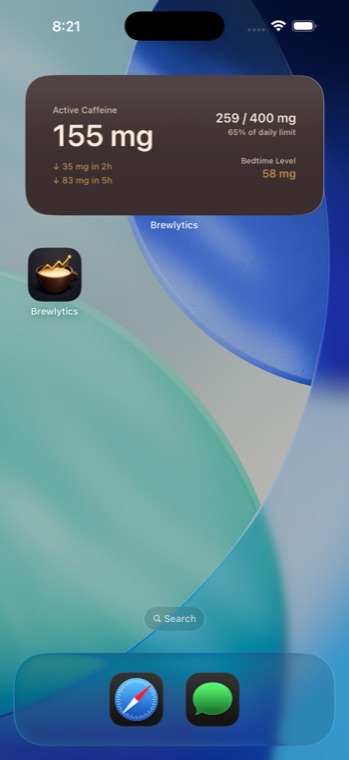
Pro widgets: the active picture
Pro adds a richer widget view for people who care about timing. Depending on the widget size, it can show active caffeine, total daily intake, decay projections, and estimated bedtime caffeine.
These values are estimates based on your logged drinks, configured bedtime, and half-life setting. They update as the app shares current data with the widget.
How to add a Brewlytics widget
Touch and hold an empty area on the iPhone Home Screen until the apps jiggle, tap Edit, then Add Widget. Search for Brewlytics, choose a size, and tap Add Widget. Use the widget for a glance and the Today screen when you need to log, edit, or delete an entry.
- Use free daily intake when your goal is simple awareness.
- Use Pro active and bedtime views when timing matters to your routine.
- Keep the estimate honest by correcting the log when a drink changes.